
Introduction
How to Protect Yourself from Cyber Fraud is an important topic for anyone who uses online banking, UPI, social media, shopping websites, or other digital services.
Cyber fraud has become a serious risk for anyone who uses smartphones, online banking, UPI, social media, or shopping websites. Scammers are constantly finding new ways to steal money and personal information through phishing messages, fake customer care calls, suspicious links, QR codes, fake profiles, and fraudulent job or investment offers. The good news is that many cyber scams can be avoided by recognizing the warning signs and following a few simple security habits. In this guide, we will explain the most common types of cyber fraud, how to protect yourself, and what to do immediately if you become a victim.
Phishing Emails, Fake Messages and Suspicious Links
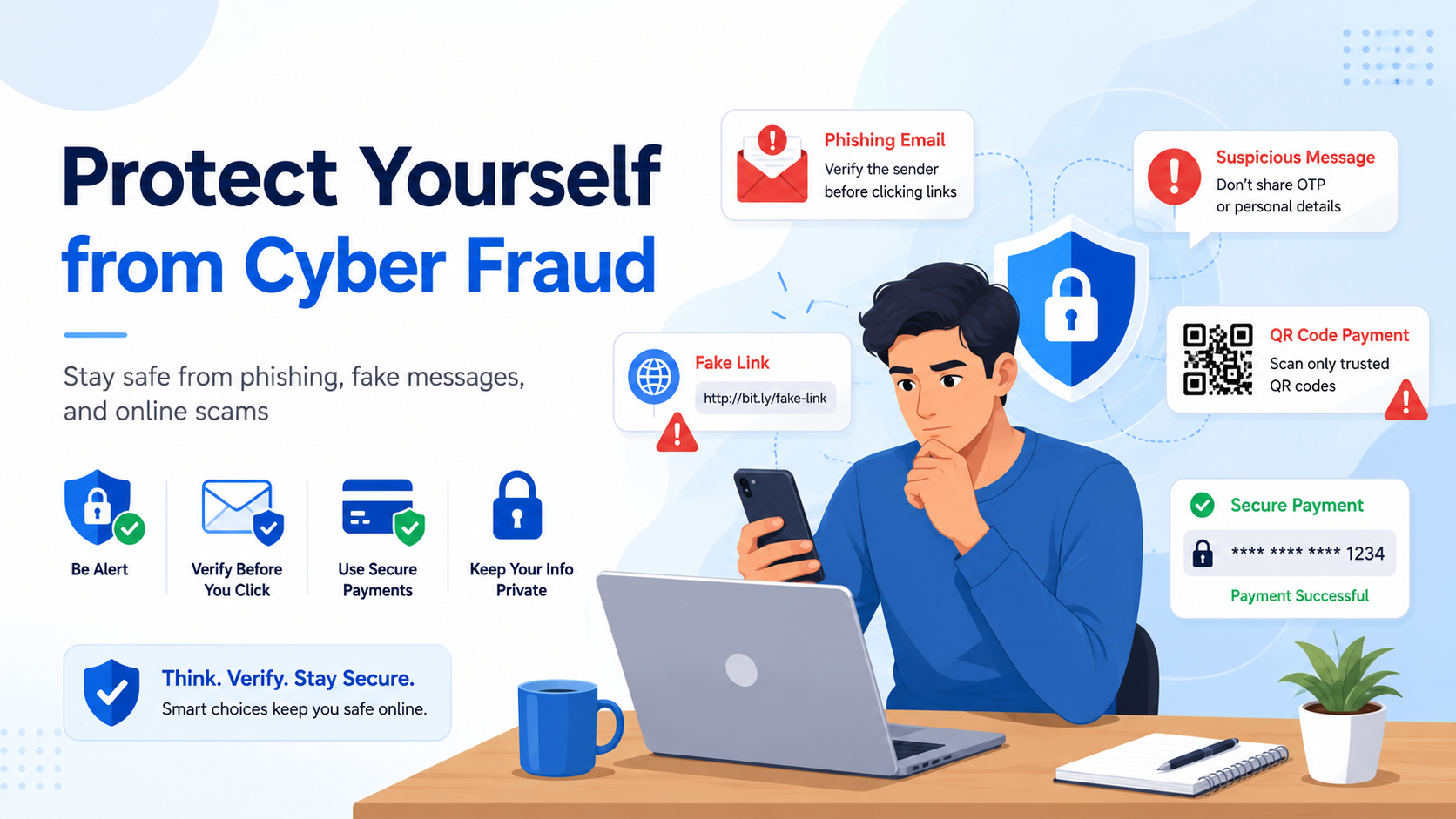
Phishing emails and fake messages are some of the most common ways cybercriminals try to steal personal information. These messages often look genuine and may appear to come from a bank, shopping website, delivery company, or even a government service. Their main purpose is to make you click a suspicious link, download a harmful file, or share sensitive details such as your password, OTP, card number, or banking information.
A common trick is to create urgency. For example, a message may say that your bank account will be blocked, your KYC has expired, or you have won a prize that must be claimed immediately. This pressure is designed to make you act quickly without checking whether the message is real.
Before clicking any link, always check the sender and the website address carefully. Look for spelling mistakes, unusual domain names, or strange email addresses. If a message asks you to log in to an important account, it is safer to open the official app or type the website address manually.
Never share passwords, OTPs, PINs, or other security details through email, SMS, or chat. Taking a few seconds to verify a message can save you from a serious cyber fraud.
OTP, UPI PIN, CVV and Banking Details Safety
OTP, UPI PIN, CVV, and other banking details are extremely sensitive and should never be shared with anyone. Cybercriminals often pretend to be bank employees, customer care agents, delivery executives, or payment support staff to convince people to reveal this information. Once these details are shared, scammers may be able to access your account or complete unauthorized transactions.
One important thing to remember is that banks and legitimate companies do not ask for your UPI PIN, ATM PIN, internet banking password, or CVV over phone calls, messages, or email. Even if the caller knows your name, account type, or some personal details, you should not trust them immediately.
Be especially careful when someone creates urgency by saying your account will be blocked, your KYC needs immediate verification, or a refund can only be processed after sharing an OTP. These are common tactics used in financial scams.
Always enter your UPI PIN only inside the official payment app while making a payment. You do not need to enter a UPI PIN to receive money.
Regularly check your bank statements and enable transaction alerts. If you notice any suspicious activity, contact your bank through its official customer support channels as soon as possible.
Fake Customer Care and Remote Access Scams
Fake customer care scams have become a common way for fraudsters to trick people into giving access to their phones or bank accounts. Scammers may create fake support numbers online or contact you directly while pretending to represent a bank, payment app, shopping website, or delivery service. They usually claim that there is a problem with your account, refund, payment, or KYC and offer to “help” you fix it.
One of the biggest warning signs is when someone asks you to install a remote access or screen-sharing app. These apps can allow another person to view your screen or control parts of your device. A scammer may then ask you to open your banking app, enter a password, or complete a transaction while they watch.
Never install an app just because a caller tells you to do so. Also, do not share screen-access codes, OTPs, PINs, or passwords with anyone claiming to be customer support.
If you need help, contact the company only through its official website, app, or verified support number. Avoid numbers found in random search results, comments, or social media posts.
A genuine support agent should not need remote control of your phone to solve a normal account problem.
Strong Passwords and Two-Factor Authentication
Strong passwords are one of the easiest ways to protect your online accounts from cybercriminals. Avoid using simple passwords such as your name, birth date, phone number, or common words. Instead, use a unique password for every important account and combine letters, numbers, and special characters.
Two-factor authentication adds an extra layer of security. Even if someone gets your password, they may still need a second verification step, such as a code from an authenticator app or a security prompt. Enable two-factor authentication on email, banking, social media, and other important accounts whenever it is available.
UPI, QR Code and Online Payment Scams
UPI and QR code payments are fast and convenient, but scammers also use them to trick people into sending money. One common scam happens when someone says they are sending you a refund, reward, or payment and asks you to scan a QR code or enter your UPI PIN. In reality, entering your UPI PIN usually authorizes a payment from your account, not a payment coming into it.
Fake payment screenshots are another common trick. A buyer may show a screenshot claiming that money has been transferred, but the payment may never have reached your account. Always check your bank balance or official payment app before handing over a product or service.
You should also be careful with unknown collect requests. Scammers may send a payment request and try to convince you that approving it will help you receive money.
Never share your UPI PIN, OTP, or screen with anyone. Do not scan random QR codes sent through messages or social media unless you fully understand what the payment is for.
For online payments, use trusted apps and websites, verify the receiver’s name before paying, and enable transaction alerts. A few seconds of checking can help prevent a costly mistake.
Social Media Impersonation and Fake Profile Fraud
Social media impersonation happens when a scammer creates a fake profile using someone else’s name, photo, or personal details. These fake accounts may look almost identical to the real profile and are often used to ask for money, collect personal information, or send harmful links.
For example, a scammer may pretend to be your friend or relative and send a message saying they urgently need money. In other cases, fake profiles may claim to represent a brand, influencer, or company and offer prizes, jobs, or investment opportunities.
Always check the profile carefully before trusting it. Look at the username, account age, number of posts, followers, and recent activity. If someone you know suddenly asks for money or sensitive information, contact them through another method before responding.
Avoid sharing too much personal information publicly, and report fake profiles when you find them. Enabling two-factor authentication can also help protect your own social media account from being taken over.
Fake Shopping Websites, Apps and APK Scams
Fake shopping websites and malicious apps are often designed to look like genuine online stores. They may offer popular products at extremely low prices to attract buyers and collect payment or personal information. In many cases, the product never arrives, or the website disappears after the payment is made.
Before buying from an unfamiliar website, check the domain name, contact information, return policy, and customer reviews. Be careful with websites that have spelling mistakes, unrealistic discounts, or only one payment option. It is also safer to avoid clicking shopping links received through random messages or social media ads.
APK scams are another serious risk, especially on Android devices. Fraudsters may ask you to download an APK file for a shopping app, refund, KYC update, or special offer. These files can contain harmful software.
Always install apps from trusted app stores and avoid unknown APK files. Never give unnecessary permissions to an app, especially access to SMS, contacts, screen sharing, or banking-related information.
Investment, Job and Work-from-Home Scams
Investment, job, and work-from-home scams often attract people by promising easy money, high returns, or quick income with very little effort. Scammers may contact you through WhatsApp, Telegram, social media, email, or fake job websites and claim that you can earn money by completing simple tasks, investing in a platform, or joining a part-time job.
A common trick is to give a small payment at the beginning to build trust. After that, the scammer may ask you to deposit a larger amount to unlock higher earnings, complete another task, or withdraw your money. In many cases, once the payment is made, the scammer asks for even more money or stops responding completely.
Fake job offers may also ask for registration fees, training charges, security deposits, or personal banking details before you are hired. Legitimate employers usually do not demand large upfront payments just to offer you a job.
Before accepting any investment or job opportunity, research the company carefully and verify its official website and contact details. Be suspicious of guaranteed profits, extremely high returns, or pressure to act quickly. Never transfer money simply because someone promises that you will earn more later.
How to Recognize Cyber Fraud Warning Signs
Cyber fraud often comes with warning signs that can help you identify a scam before you lose money or personal information. One of the biggest signs is urgency. Scammers may say your account will be blocked, your KYC has expired, or you must make a payment immediately.
Another common warning sign is an offer that sounds too good to be true, such as guaranteed profits, free prizes, very high discounts, or easy work-from-home income. You should also be careful if someone asks for your OTP, UPI PIN, password, card details, or asks you to install an unknown app.
Suspicious links, unusual email addresses, poor website design, and requests for advance payment are also common signs of fraud.
If a message or call makes you feel pressured, stop and verify the information independently. Contact the company through its official website or app instead of using the number or link provided by the sender. A few minutes of checking can prevent a serious cyber scam.
What to Do Immediately If You Become a Cyber Fraud Victim
If you become a victim of cyber fraud, the most important thing is to act quickly. Do not waste time arguing with the scammer or waiting to see whether the money comes back. The faster you report the fraud, the better the chance of stopping further transactions.
If money has been taken from your bank account, UPI wallet, or card, immediately contact your bank through its official customer care number or mobile app. Report the transaction as unauthorized and ask the bank to block the affected card, account access, or payment method if necessary. RBI guidance also recommends reporting unauthorized electronic transactions to the bank as early as possible.
In India, financial cyber fraud can also be reported immediately by calling the National Cyber Crime Helpline at 1930, which operates 24/7. You can also file a complaint through the official National Cyber Crime Reporting Portal.
Keep all evidence related to the fraud. Take screenshots of messages, transaction details, phone numbers, email addresses, fake profiles, payment receipts, UPI IDs, and suspicious website links. Do not delete chats until the complaint process is complete.
If you shared a password, change it immediately and also change it on any other account where you used the same password. Enable two-factor authentication and log out of unknown devices.
If you installed a suspicious app or gave someone remote access to your phone, disconnect the device from the internet, remove the app, review its permissions, and secure your banking accounts from another trusted device.
Quick action, proper evidence, and immediate reporting can make a major difference after cyber fraud.
Frequently Asked Questions (FAQs)
1. What is cyber fraud?
Cyber fraud is any scam carried out using the internet, mobile phones, social media, email, online banking, or digital payment systems. It can include phishing, fake shopping websites, UPI scams, identity theft, fake job offers, and many other types of online fraud.
2. How can I identify a phishing message?
Phishing messages often contain suspicious links, unusual sender addresses, urgent warnings, prize offers, or requests for passwords and banking information. Always verify the sender and avoid clicking links in unexpected messages.
3. Should I ever share my OTP or UPI PIN?
No. Your OTP, UPI PIN, ATM PIN, CVV, and banking passwords should always remain private. Genuine banks and payment services do not normally ask you to share these details over calls, messages, or email.
4. Do I need to enter my UPI PIN to receive money?
No. A UPI PIN is generally used to authorize payments from your account. If someone tells you to enter your UPI PIN simply to receive money, treat the request with caution and verify it before continuing.
5. Are QR codes always safe?
No. QR codes can be used for legitimate payments, but scammers may also send QR codes designed to make you authorize a payment. Scan a QR code only when you know who sent it and understand exactly what transaction you are approving.
6. How can I know whether an online shopping website is genuine?
Check the website address, contact information, return policy, reviews, payment options, and overall reputation. Be careful with unrealistic discounts, strange domain names, poor website quality, or websites asking for unusual payment methods.
7. What should I do if a customer care agent asks me to install a remote access app?
Do not install it until you have independently verified that the request is genuine. Scammers sometimes use screen-sharing or remote access applications to view sensitive information or control a victim’s device.
8. Can strong passwords really prevent cyber fraud?
Strong passwords cannot prevent every type of fraud, but they make unauthorized account access much harder. Use a different password for important accounts and enable two-factor authentication wherever possible.
9. What should I do if I accidentally share my password with a scammer?
Change the password immediately from the official website or app. If you use the same password elsewhere, change those accounts too. Enable two-factor authentication and review your account for unknown login activity.
10. What should I do immediately after losing money to cyber fraud?
Contact your bank or payment service immediately and report the unauthorized transaction. Secure your accounts, save screenshots and transaction details, and report the fraud to the appropriate cybercrime authorities as quickly as possible.
Conclusion
Cyber fraud can happen to anyone, but a few smart habits can greatly reduce the risk. Always think before clicking unknown links, sharing personal information, scanning QR codes, or sending money to someone you do not fully trust. Keep your passwords strong, enable two-factor authentication, use trusted apps and websites, and never share your OTP, UPI PIN, CVV, or banking password.
Most scams succeed because they create fear, urgency, or excitement. Taking a few extra minutes to verify a message, call, website, or payment request can save you from a serious financial loss.
If you ever become a victim of cyber fraud, act quickly. Contact your bank, secure your accounts, keep all evidence, and report the incident through the appropriate cybercrime reporting channels.
Online safety is not about being afraid of technology. It is about using it carefully and knowing when something does not look right.